Always-on agents,
on your own Mac.
A Pilot is an always-on agent that looks after one of your projects. It runs on your own Mac, with the agent login you already have. It keeps its own task list, hands the work to workers, checks what they did, and wakes by itself. When it needs you, it reaches you on your phone.
macOS · Apple silicon
ParaPilots is a mod of Paradev, the open-source Mac app for running coding agents: the Paradev you know, with Pilots added. It is local first: no cloud machine runs your agents, so your Mac must be on, with ParaPilots open. It is a private beta for Macs with Apple silicon.
What it is
Pilots that look after your projects.
If you run several coding agents across several projects, most of your day goes to keeping track: which agent is on what, what is left to do, what changed while you were away. A Pilot does that for you, inside each project.
A project can have several Pilots: one for releases and one for the docs, say. Each has a face, a name, instructions in your own words, and one conversation you can pick up at any time.
A Pilot never edits your project itself. Every change goes to a worker, in its own copy of the project, on its own branch. The Pilot reads the result and checks it before it tells you the work is done.
Local first. Your Pilots and their workers run on your own Mac, with the agent login you already have. Your projects stay in your own folders, and no server of ours runs an agent. Our servers sign you in, connect your phone to your Mac and pass notifications on. Your agent talks to its own model, as it does today.
Always on. A Pilot wakes by itself: on a timer you set, when a worker reports, when you add a task or write to it. It keeps watch while you do something else. Today that needs your Mac on and ParaPilots open. A Pilot that came due while the app was closed wakes soon after you open it.
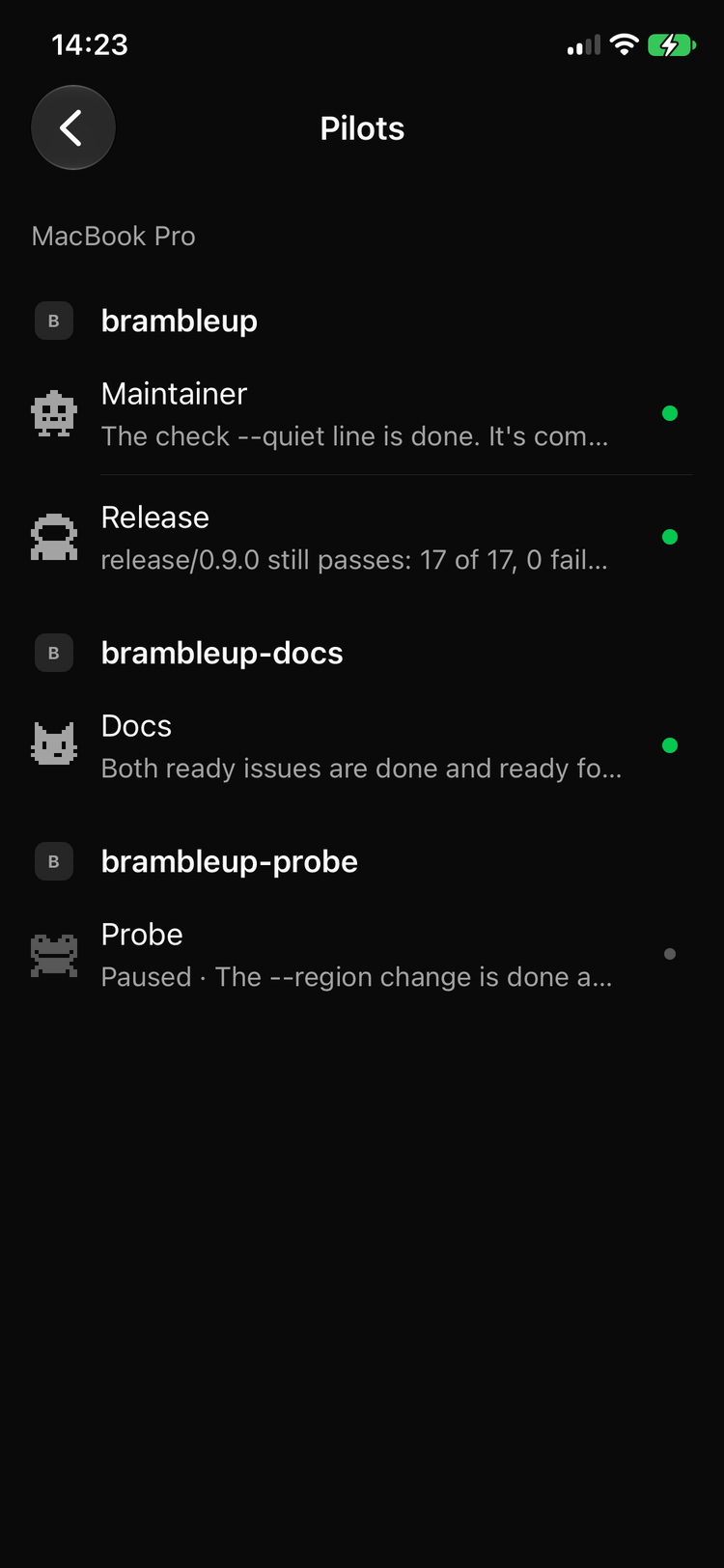
From anywhere. ParaPilots for iPhone puts your Pilots in your pocket. Talk to them, answer their questions, add a task, read their updates, wherever you are. A Pilot reaches you with a push notification that shows its own line, such as "PR #12 is merged; the release goes out tonight." Only Pilots notify you, never their workers, and a Pilot you already have open stays quiet.
And you can set a Pilot up just by talking to it: tell it "wake every hour" or "rewrite your instructions", and it does.
What you can make of one
Give a Pilot a role.
A Pilot's role is its instructions, in your own words. Here are five roles to start from.
Your project manager
One for each project, always there to talk to. It knows what is open, which worker is on what, and what changed while you were away.
Your chief of staff
One Pilot that looks across the others. Tell it once, and it changes the other Pilots' instructions and limits for you, and says what it changed.
Release manager
It keeps the release checklist moving: a worker for the notes, a worker for the version bump, and its own check of each before it tells you the release is ready.
Docs keeper
It reads the docs against the code. When a page says something the code no longer does, it sends a worker to fix it, or asks you which one is right.
Issue triage
On each round it reads the new issues, through the tools signed in on your Mac. The clear ones go on its task list; the unclear ones come to you as a question.
These are examples, not presets: you write the role, and you can change it at any time.
Where it shows
Five places in the app.
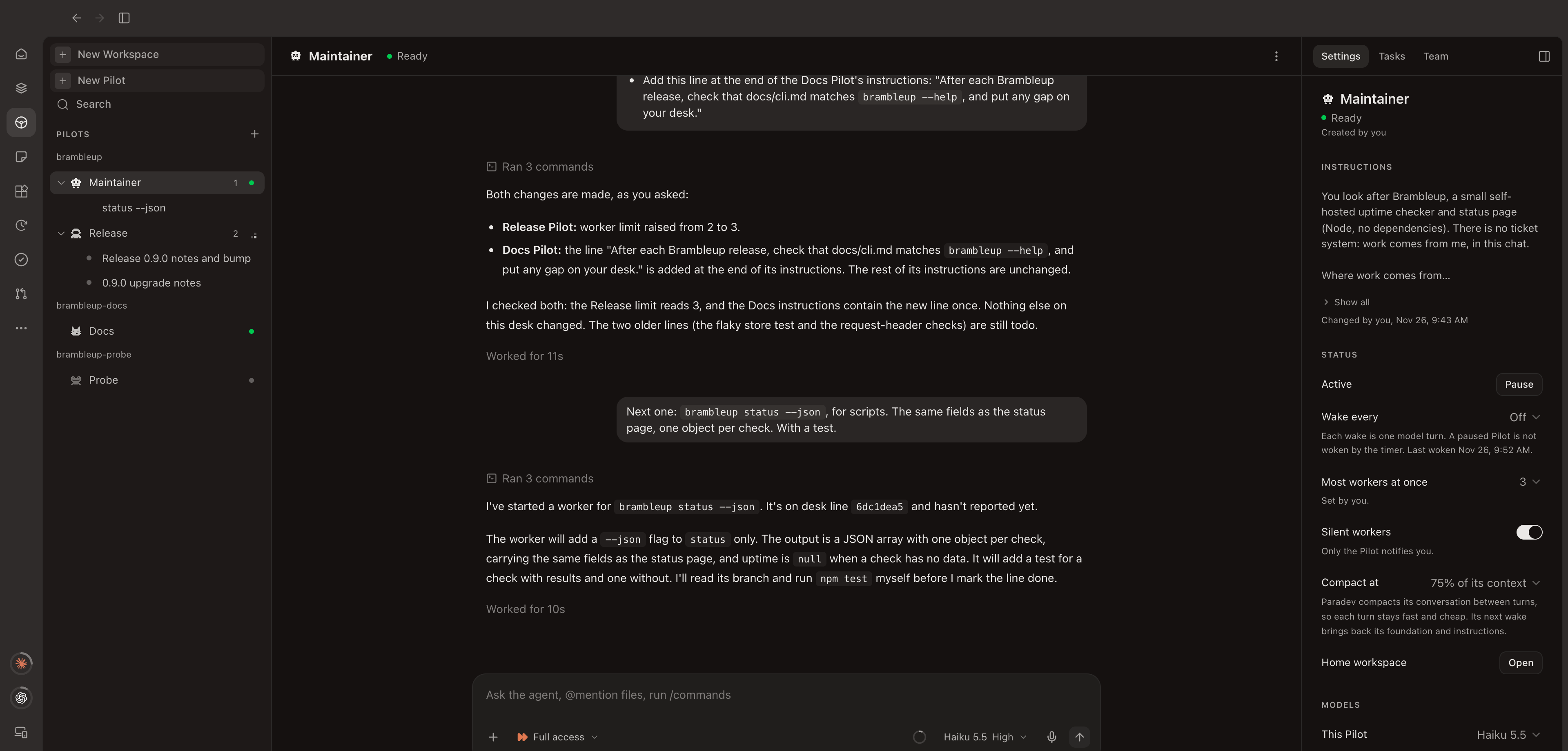
Everything you know from Paradev is still there. Pilots add one destination, in the same layout: an icon rail, a sidebar, the screen in the middle and a panel on the right.
- 1The rail.
A Pilots button, a steering wheel, right after Workspaces. One click takes you to your Pilots.
- 3The Pilot's screen.
Its conversation, in the chat view you know from Paradev, with its state and a pause menu in the header.
- 4The panel.
Its instructions, its wake timer, its models, its task list and its team of workers. Change any of them in place.
- 5The command line.
paradev pilotsdoes everything the panel does: for you, for your scripts and for the Pilots themselves.
What a Pilot is made of
Three layers.
The foundation
What every Pilot knows from the start, and no instruction can switch off: how to work in Paradev, how to find the tools you have connected, how to keep its task list, and to leave your files to its workers. It builds on the skills and commands the Paradev team wrote, so a Pilot keeps up as Paradev changes.
The instructions
Your words: what this Pilot looks after, where its work comes from, when it should ask you. A new Pilot asks you, and writes your answer down itself. You can change them at any time.
The tasks
What the Pilot is busy with. You add tasks in the panel or from your phone; the Pilot adds and ticks them itself. Your ticket system, if you have one, stays where it is: a Pilot works with it when its instructions say so.
Where it stands
Working today, coming next.
Built
- Make a Pilot with just a name. It asks you what to look after and writes its own instructions.
- One conversation per Pilot. It is still there after a restart, and your next message wakes the Pilot.
- A wake timer, from every 15 minutes to once a day, and one-off wakes a Pilot sets itself: "wake me in 20 minutes".
- A task list you and the Pilot both keep. A task can link to its ticket.
- Workers: a Pilot changes no file itself. It calls in a worker for each change, in its own copy of the project, up to the limit you set.
- Hearing back: a worker's report wakes its Pilot by itself. The Pilot checks the work and unblocks stuck workers.
- A Team tab on each Pilot: its workers now, and the last ten before.
- Pilots in the sidebar, inside their projects, with their workers folded under them.
- A Pilot changes its own instructions, or another Pilot's, when you tell it to. The panel shows who changed what and keeps every earlier text.
- One model for the Pilot, another for its workers.
- A clean start: a Pilot loads nothing of your personal Claude setup unless you switch it on.
- A command for everything the panel does, and example instructions to start from.
- A Mac app, signed and checked by Apple, that updates itself. Your Pilots and their workers run in it, on your own Mac.
- ParaPilots for iPhone: run your Pilots from anywhere. Talk to each one, answer its questions, add tasks. It comes through Apple's TestFlight, once you are approved from the waitlist.
- A push notification on your phone when a Pilot has something for you, with the Pilot's own line. Only from Pilots, never from their workers.
Next
- The phone app for more testers, then for everyone.
- Everything that needs you, across all your Pilots, in one list.
- Slack, GitHub and Linear: write to a Pilot in Slack, or mention it in a ticket, and it wakes.
- A cloud option: Pilots that keep working with your Mac closed.
- Pilots for a team: set one up once, and everyone talks to it.
- A memory that outlasts the conversation.
- A reviewer after each worker: a second agent reads every change.
- A window with only your Pilots, and nothing else.
- More things that wake a Pilot: a failed check, a review, a schedule.
- Paradev's connections, for every Pilot.
- More from the phone: create a Pilot, change its instructions and its timer.
- Awake with the app closed.
- What a Pilot did while you were away.
- What each Pilot costs you.
- One stop for everything: pause every Pilot at once.
- A guided first run, from the download to a working Pilot.
- Worked examples for three ways of working: no tickets, GitHub Issues, Linear.
The whole roadmap, with what is decided and what is still an idea.
ParaPilots is a private beta, for Macs with Apple silicon. Join the waitlist for an account: you get a welcome email when you are approved. It has the Mac download and a TestFlight link for the phone app. The phone's setup is quick: install TestFlight on your iPhone, open the link, and sign in with your email.
A mod of Paradev
Paradev, plus Pilots.
Paradev is an open-source workspace for Claude Code, Codex and other coding agents: each agent works on its own branch, and you review their changes in one app. Its code is public on GitHub under the MIT license.
ParaPilots is a mod of Paradev: the same app, modified to add Pilots. We use Paradev every day, and we wanted an agent that stays with each project. It installs as its own app, so it runs beside your Paradev and leaves it exactly as it is.
The app underneath is the Paradev team's work, and we are grateful they build it in the open. ParaPilots is an independent project, not made by them. If Pilots prove useful, we would be glad to see them in Paradev itself one day.